Kicking the Tyres on AWS FinOps Agent (Preview)
AWS has been steadily expanding its suite of frontier agents, and the FinOps Agent which has just entered public preview is the latest one to date. When in it’s current preview state it has no charges attached, which makes right now a good time to take it for a spin before it moves to GA and the economics change. We’d been experimenting with the DevOps Agent earlier with some of our internal solutions and found it pretty capable, so I was interested to see how this one shaped up.
A few things to know before diving in: Like many AWS Previews, the agent is currently only available in us-east-1 (N. Virginia), and unlike some of the other frontier agents, its configuration and invocation options are extremely limited.
What Is It?
The AWS FinOps Agent is a managed AI agent that continuously monitors your AWS costs, investigates anomalies, and surfaces optimisation opportunities across your cloud environment. Rather than you having to manually query your own cost data and bring your own findings and conclusions together, the agent aims to do that work autonomously and surfaces findings in a conversational interface.
Setting It Up
Setup currently is a five-step guided wizard in the AWS Console. It’s reasonably quick, and for most people the defaults will get you running an experiment without needing to tweak IAM manually.
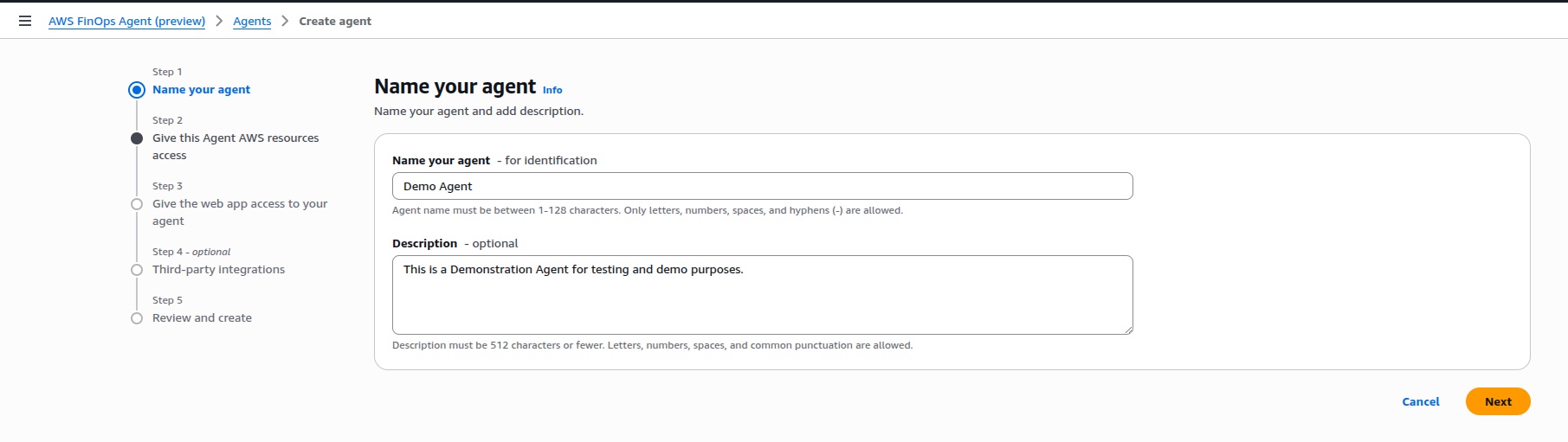
Step 1 - Name your agent
Give the agent a name and an optional description.
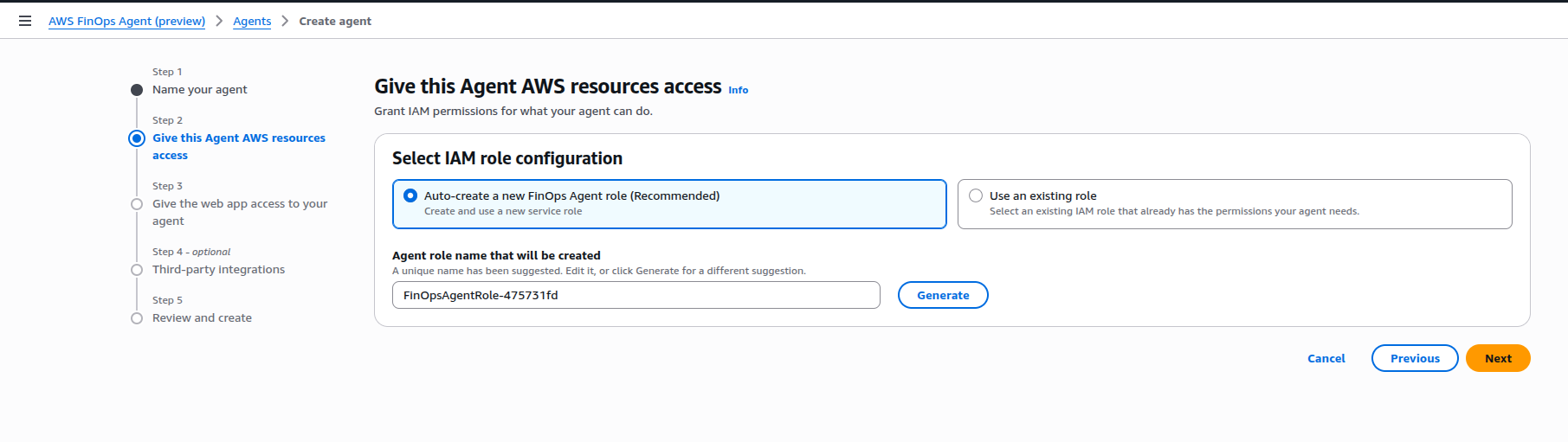
Step 2 - Give the agent AWS resource access
This creates the IAM role that the agent itself assumes to query your cost and usage data. The auto-create option generates a role with the managed policy FinOpsAgentAgentPolicy, which has read-only access across Cost Explorer, Budgets, Compute Optimizer, EC2, RDS, Lambda, ECS, and more. Optionally, you can create more suitable roles and policies for your use case and environments and pass them through to the agent for use instead.
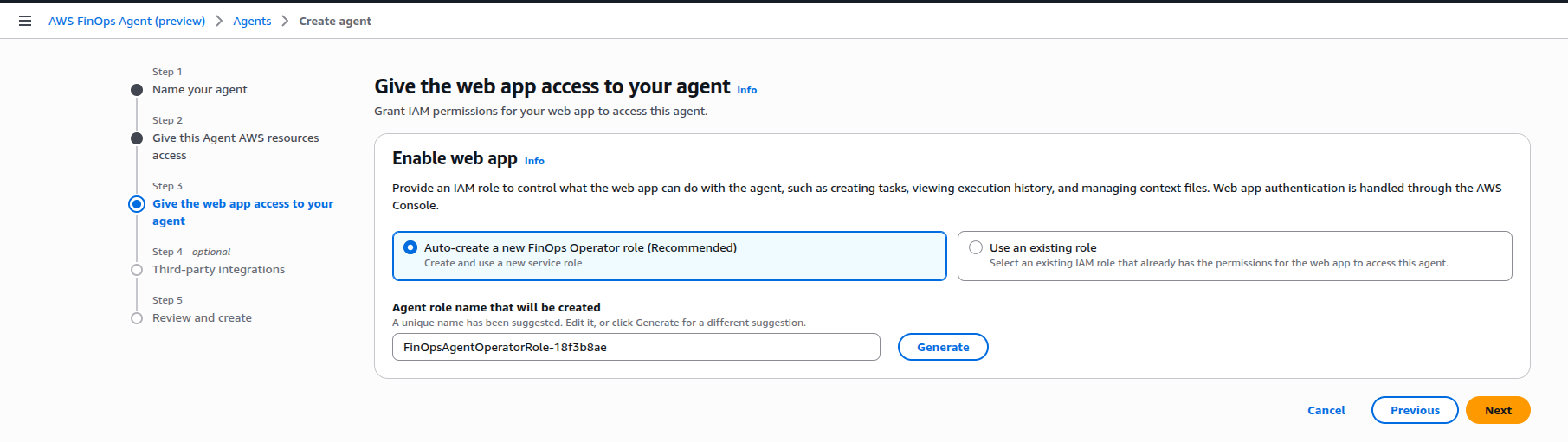
Step 3 - Give the web app access to your agent
The web app is your primary interface for interacting with the agent, running tasks, and managing configuration. It too needs its own IAM role - the FinOpsAgentOperatorRole - which controls what operations the web app can perform against the agent API.
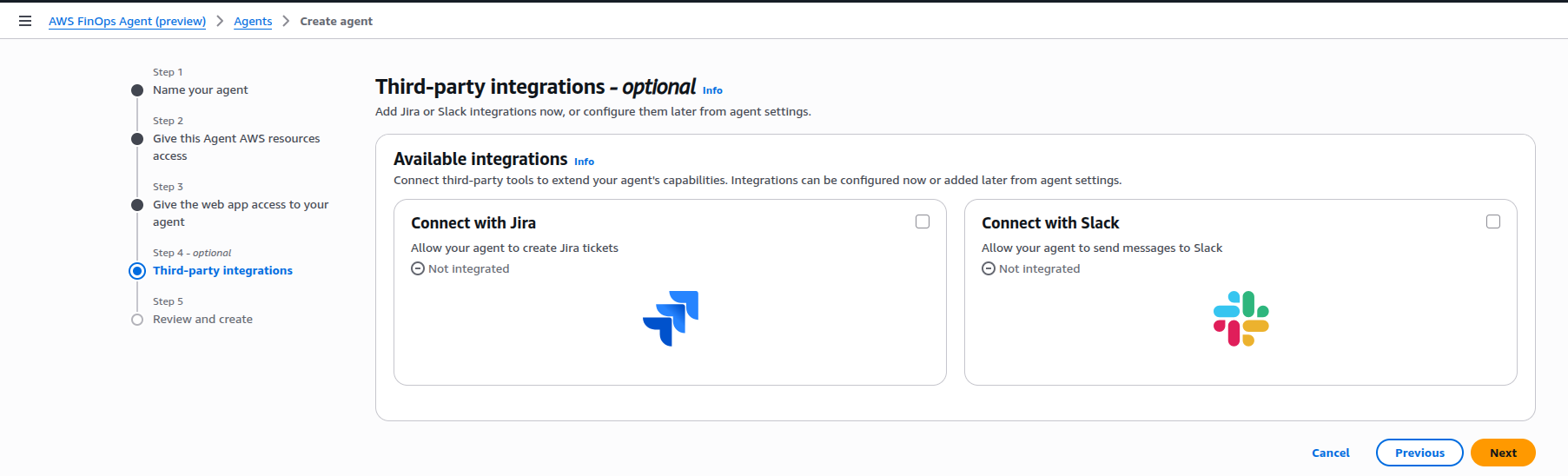
Step 4 - Third-party integrations (optional)
Out of the box, the agent supports Jira and Slack integrations. These are the two write-capable surfaces the agent can act on: it can create Jira tickets, add Jira comments, and post Slack messages. You can skip this during setup and wire it up later.
Step 5 - Review and create
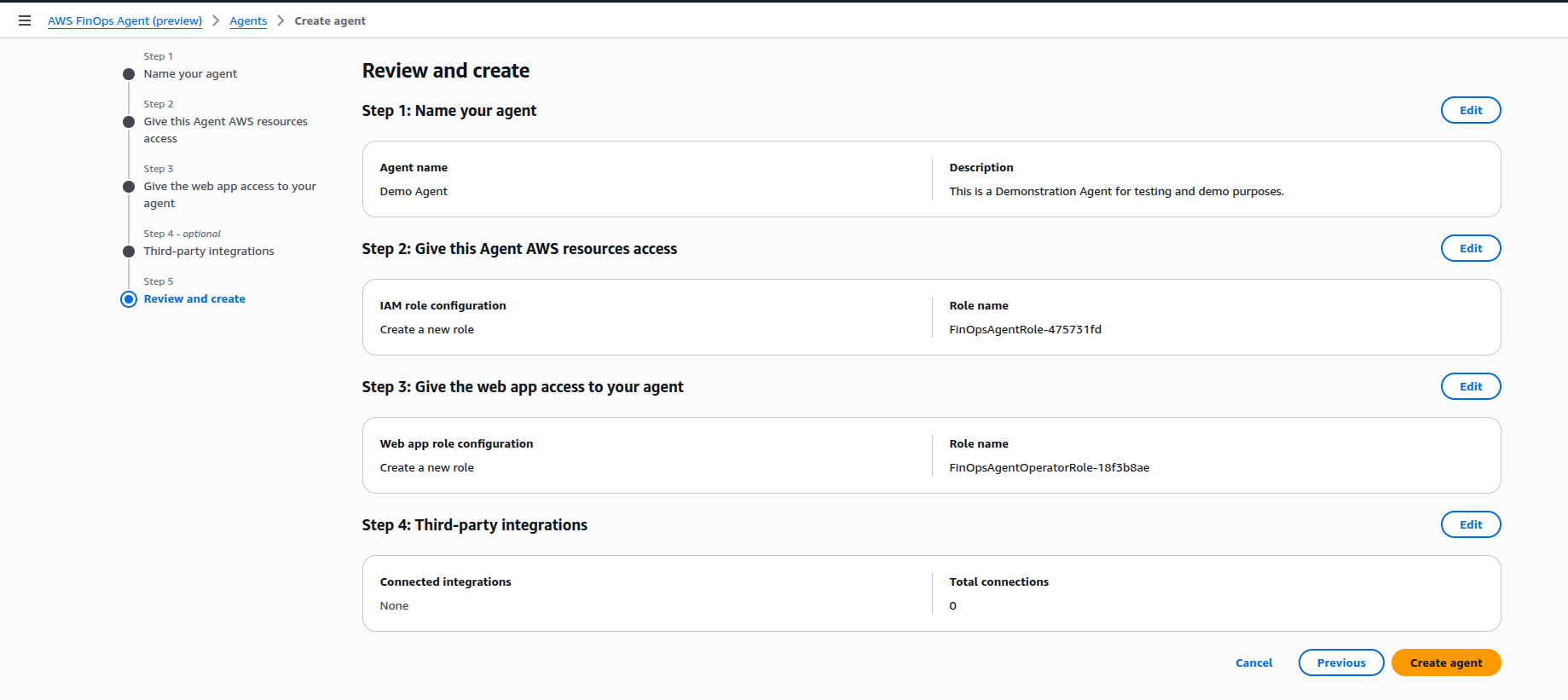
A summary of your configuration before the agent is provisioned.
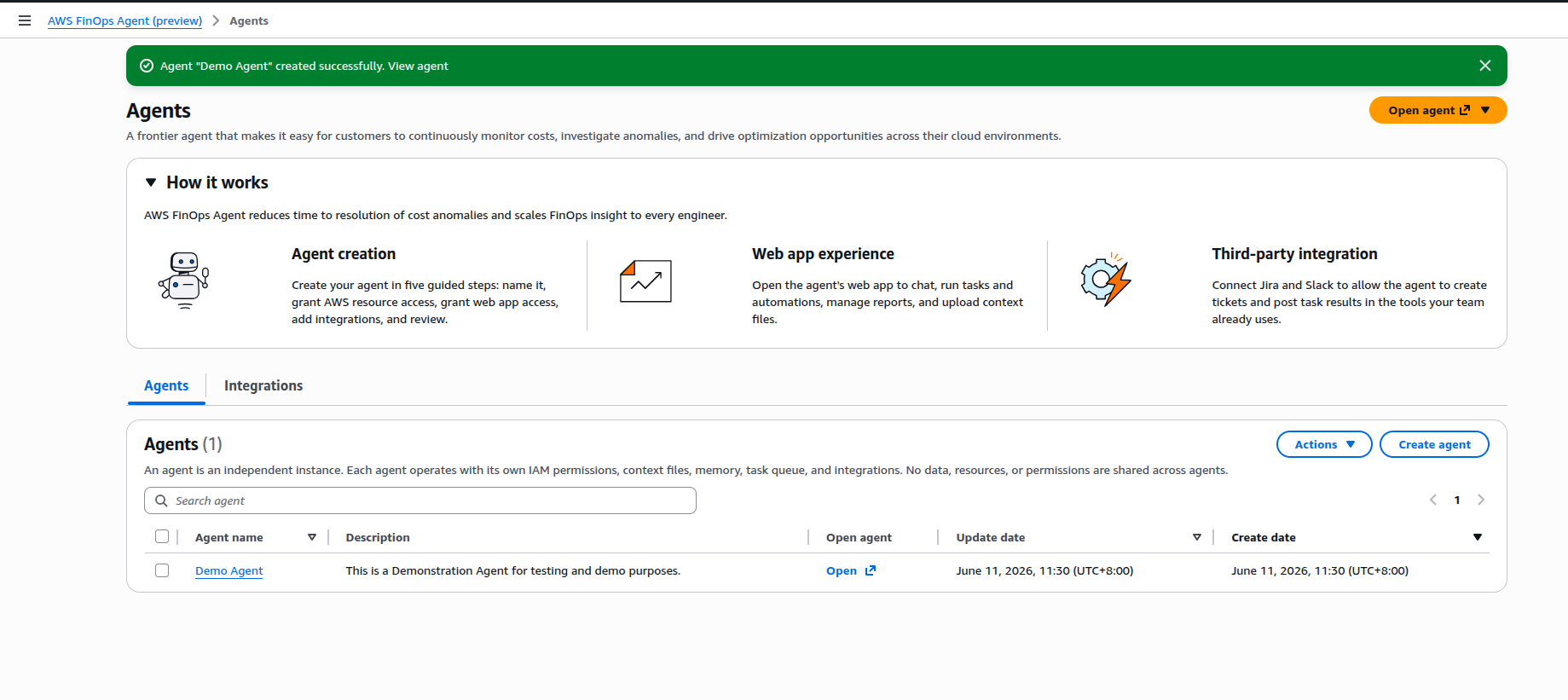
Once created, you land on the Agents list page with a confirmation banner and an “Open agent” button that launches the web app.
The Web App
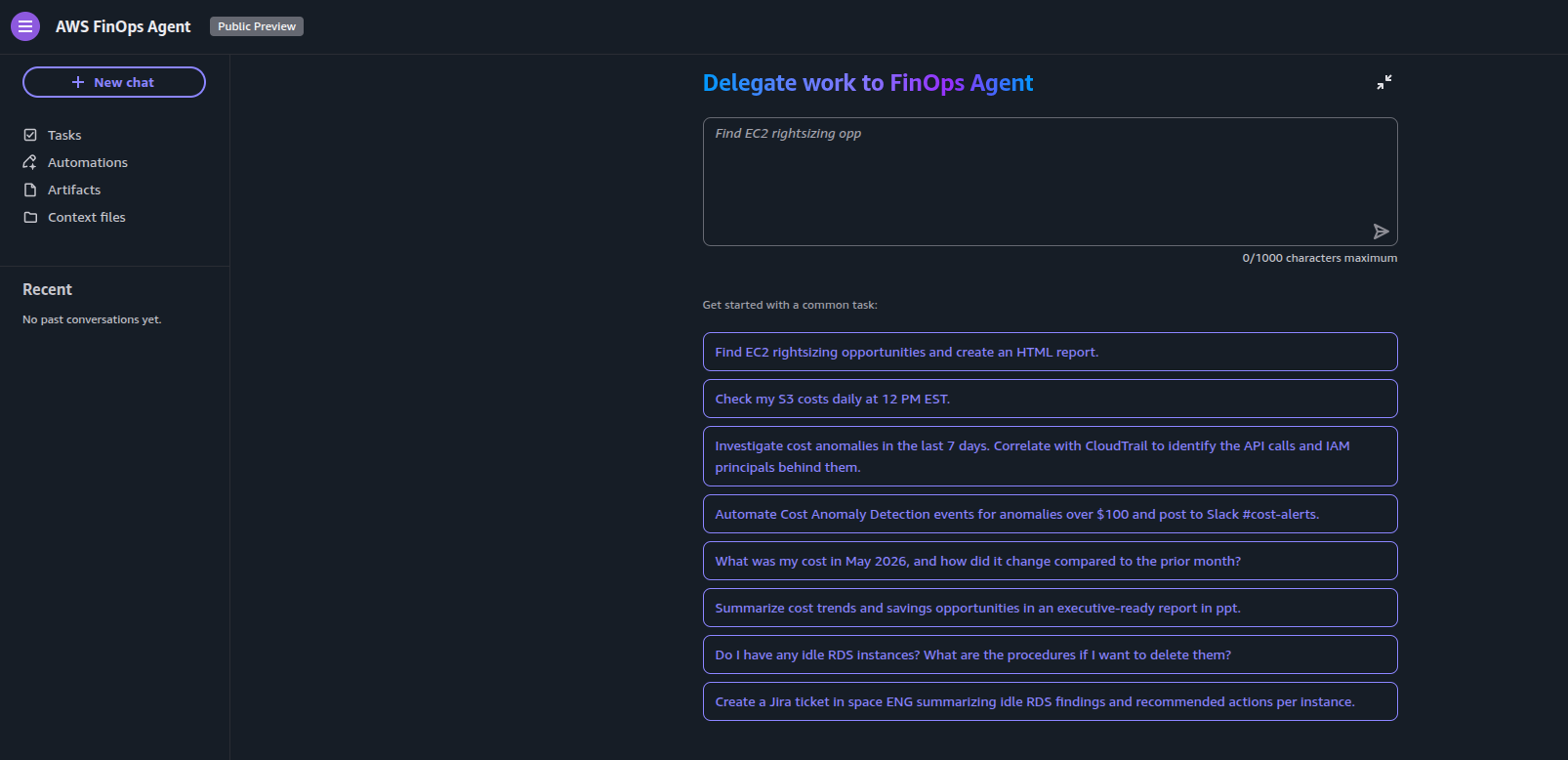
Now that we have the agent created we then open up the web app. This is where you spend most of your time with the agent. It’s a dark-themed chat interface with a sidebar for navigating between a variety of sections currently including Tasks, Automations, Artifacts, and Context files.
The landing screen shows a prompt input and a set of starter suggestions to get you up and going. I found that most of these work well without any custom configuration.
Core Concepts
Tasks
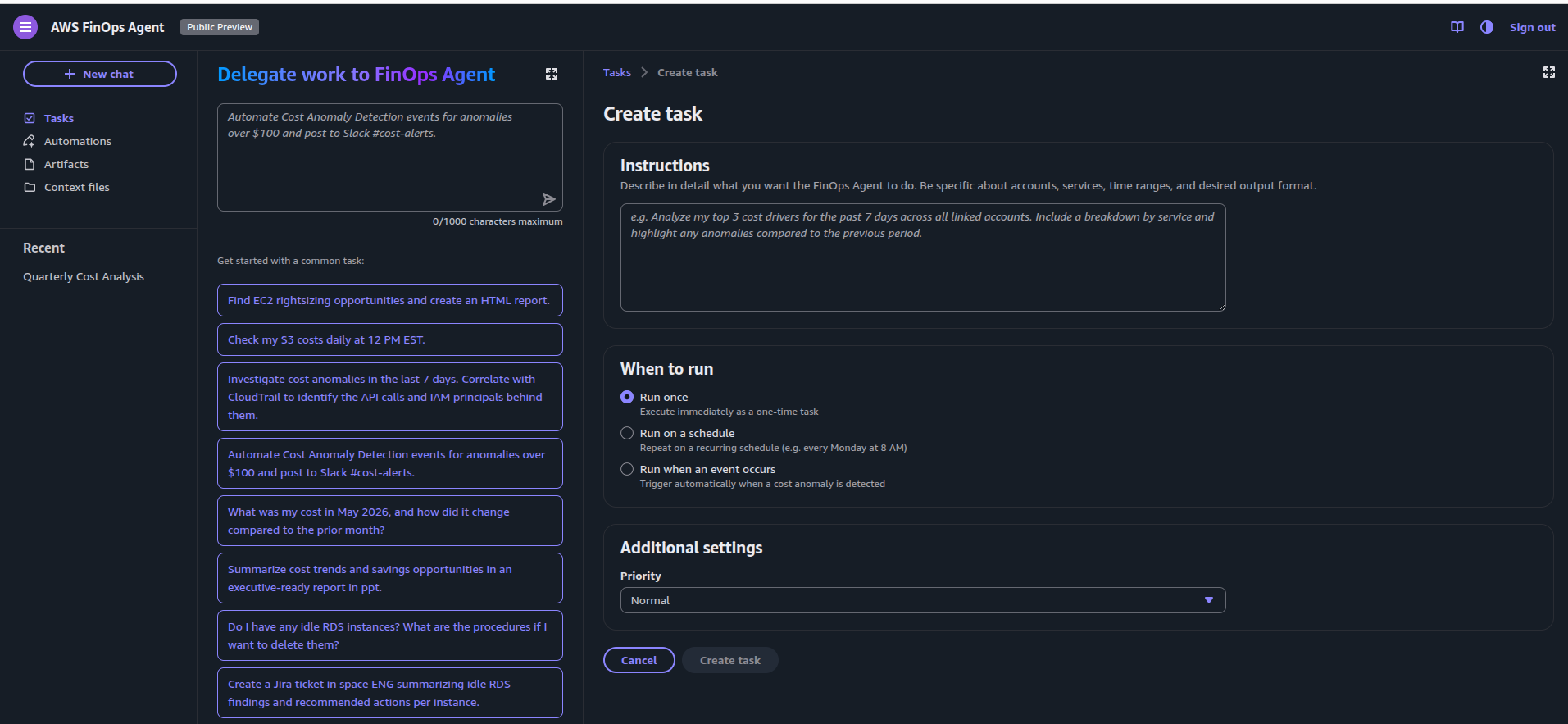
Tasks are on-demand or scheduled units of work the agent runs in the background. You can invoke them three ways:
- Run once - By passing a prompt through the chat interface or the Tasks page directly
- On a schedule - By passing a scheduled prompt daily through to monthly, with configurable delivery times
- On an event - Triggering a prompt or task through to the agent through an external event.
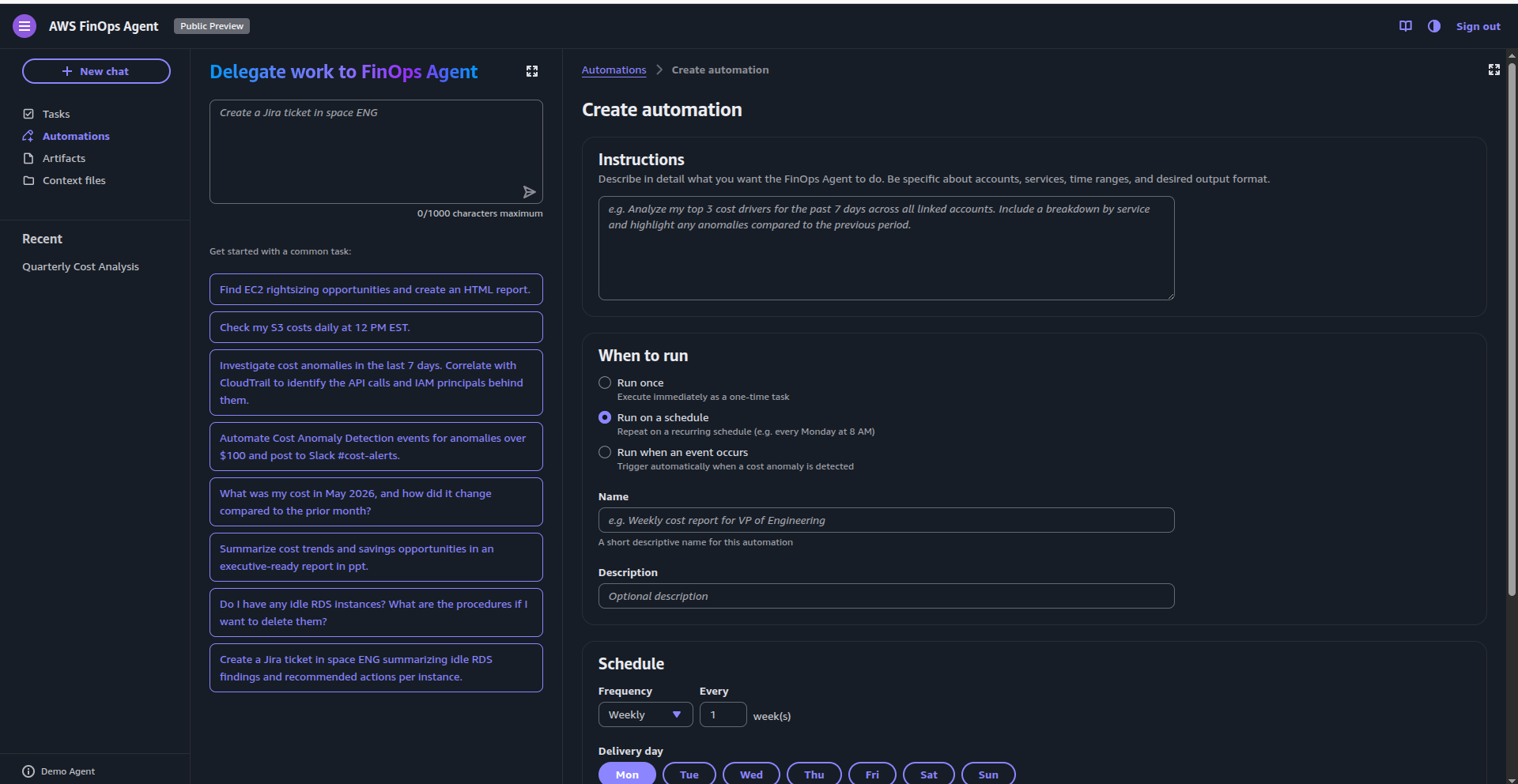
At this stage, the only supported trigger is a Cost Anomaly Detection event. Compare that to the DevOps Agent, which supports webhooks and a broader set of invocation capabilities. I’d expect this to evolve in the same direction over time, eventually allowing invocation from other AWS services and external systems such as 3rd party FinOps tools.
Automations
I found the concept of Automations a little strange, as the distinction between “Tasks” and “Automations” is quite unclear - the UI and sample prompts for both are nearly identical, and there is an absence of documentation about them currently, which is common for service previews.
It would be great if you could build a set of automations based on AWS SSM Runbooks and other SOP tools that could be called from scheduled tasks to perform actions with guardrails, such as shutting down idle resources or escalating anomaly findings through incident management systems.
Artifacts
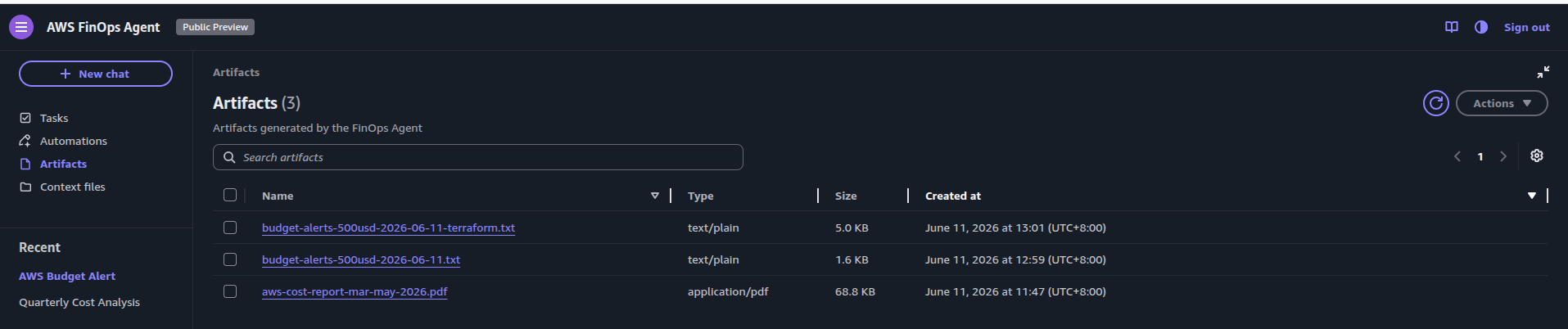
Artifacts are files generated by the agent - HTML, PDF, and PPT are stored here for download and future reference.
Outside of asking the agent to generate a quarterly cost report that produced a structured PDF with spend trends, service breakdowns, anomaly analysis, and recommended actions, I was also able to ask it to create the code for budget alerts in both CloudFormation and Terraform, which was a nice surprise.
Context Files
Context files are documents you upload to help the agent understand your organisation in more detail. The example below is from the agent documentation - a CSV mapping account IDs to team names and leads:
account_id,team_name,team_lead,email
123456789012,Data Platform,Jane Smith,jsmith@example.com
234567890123,ML Training,Alex Chen,achen@example.com
345678901234,Production,Sam Lee,slee@example.com
This context lets the agent attribute costs to the right teams and produce reports that are relevant to your org structure rather than raw AWS account numbers.
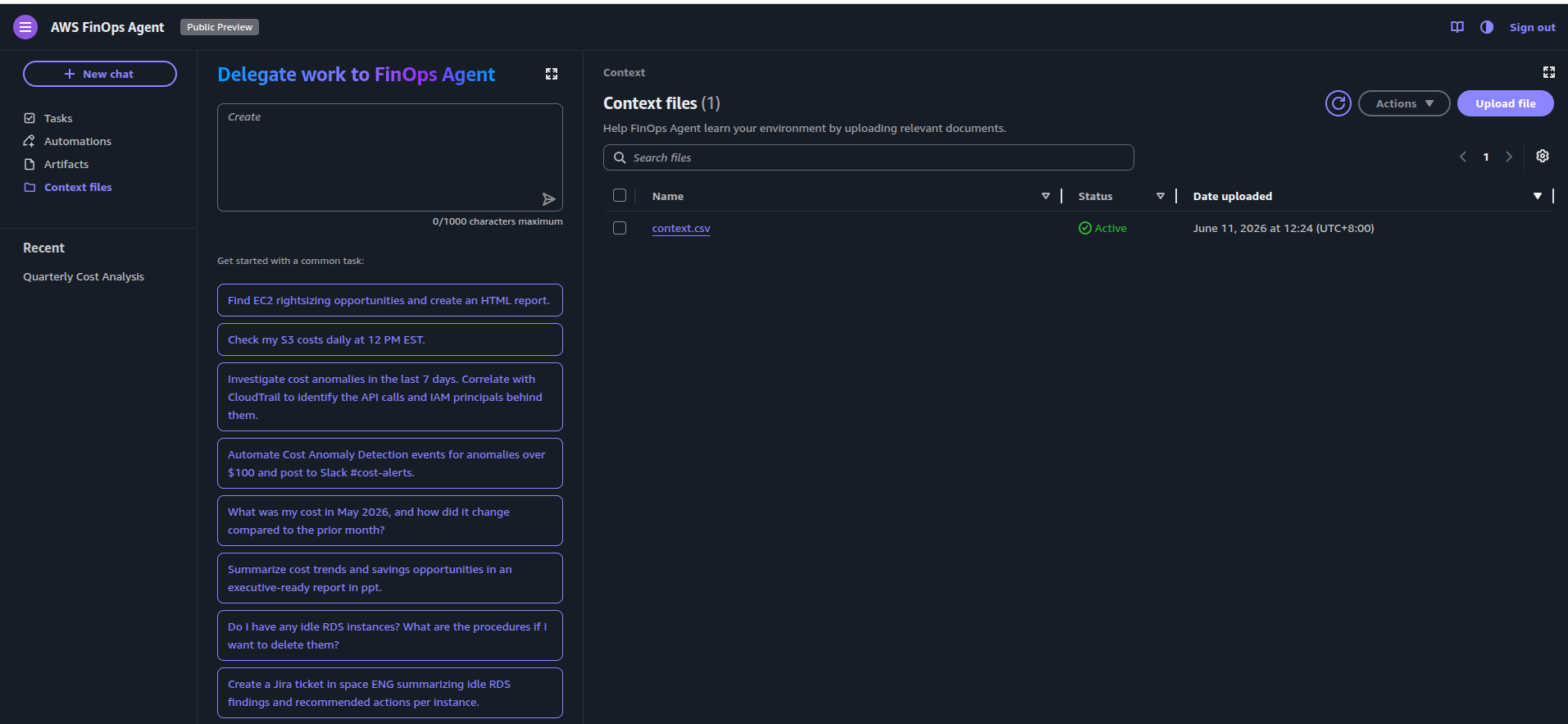
It would be useful to have an API for updating context files programmatically, or have the agent inherit organisational metadata such as AWS Organizations tags, SSO account assignments, or internal CMDB data. I’d expect this is on the roadmap.
Seeing It in Action
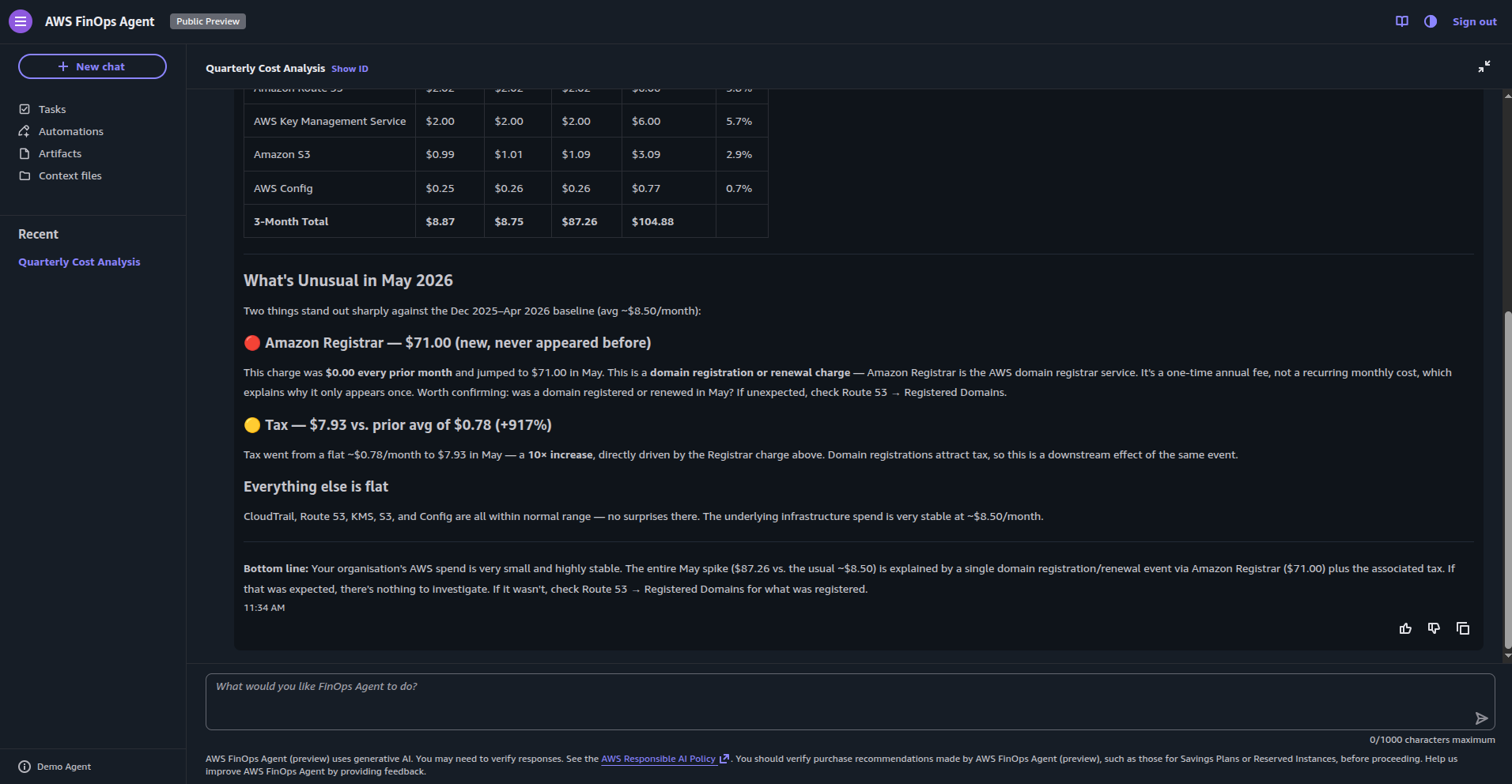
Running a quarterly cost analysis shows the agent’s capability. Even on an idle account such as mine, it pulls cost data across the specified period, identifies the most expensive services, surfaces unusual charges, and produces a summary with commentary:
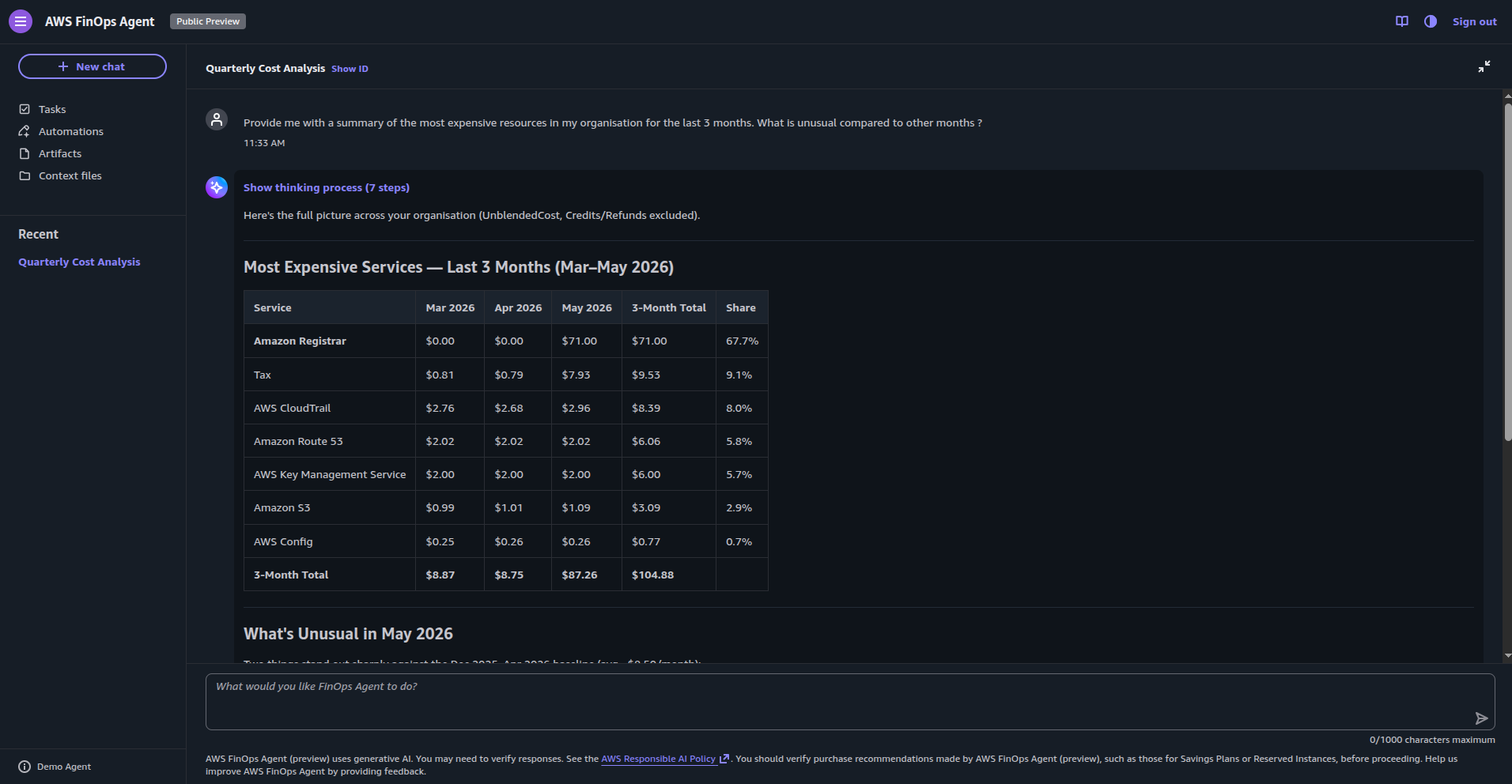
In this session, as you can see it identified an Amazon Registrar charge as unusual given that it infrequently appears.
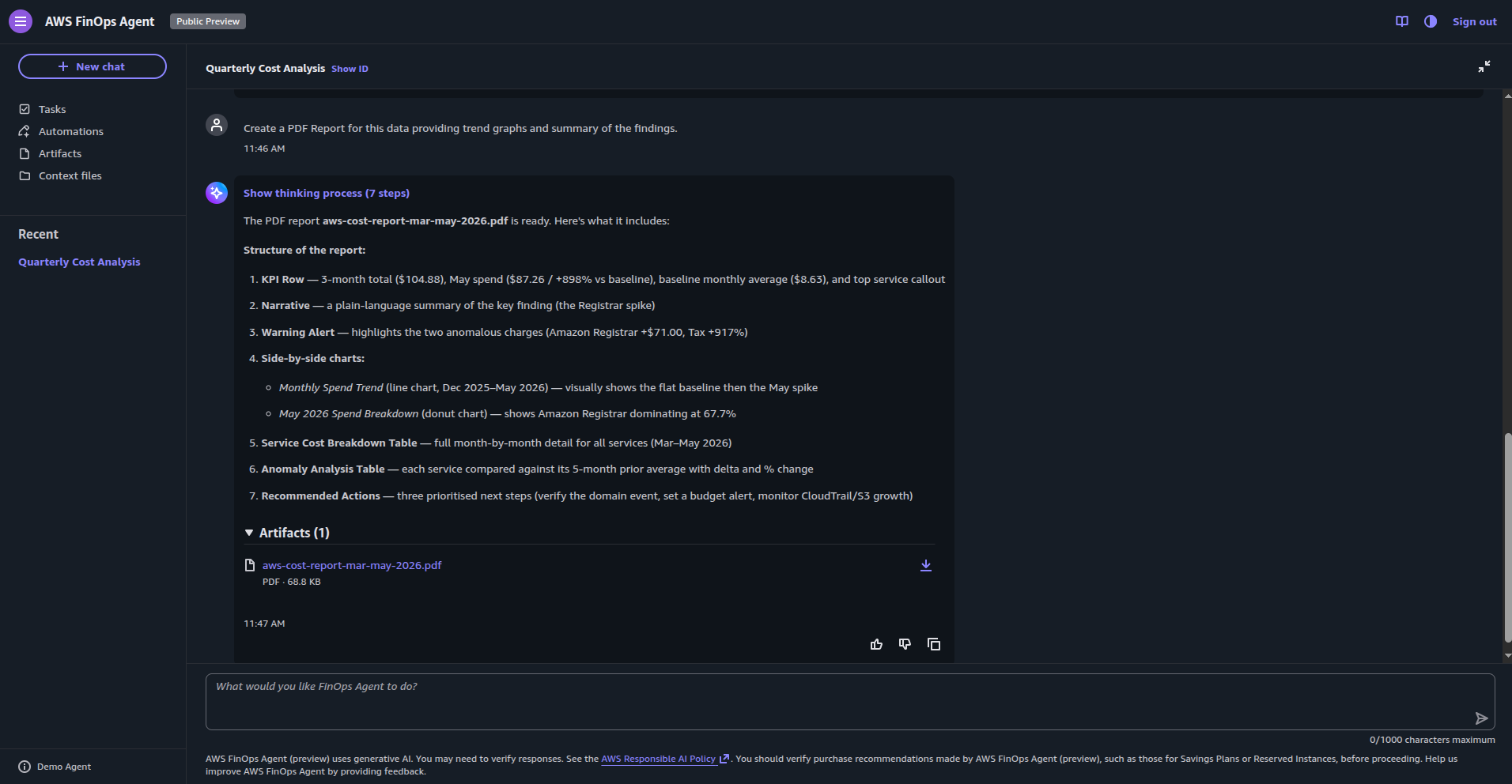
When asked to generate a PDF cost report, the agent outlines the structure of what it’s about to produce and then generates the artifact:
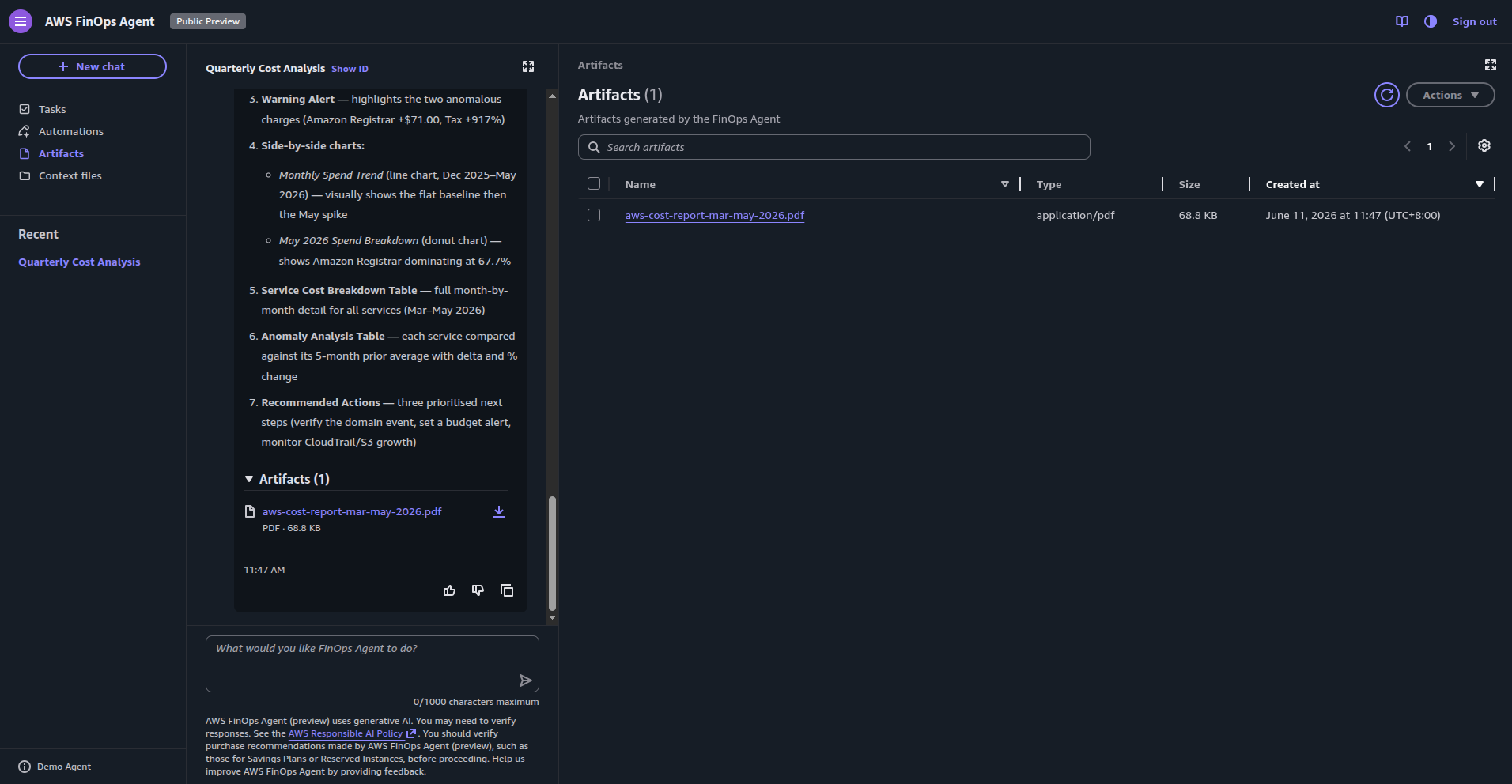
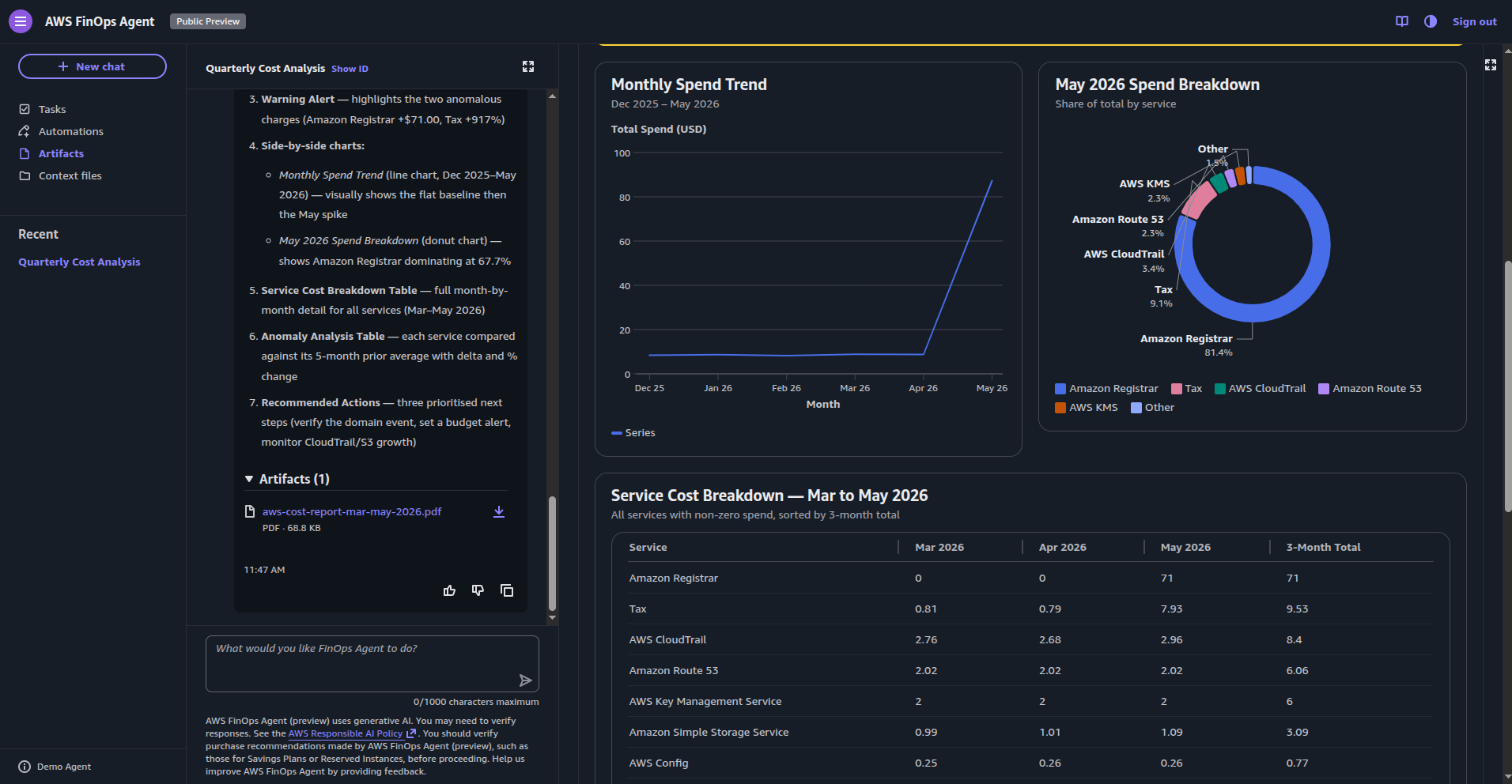
The resulting report includes monthly spend trends, a May spend breakdown by service, and a service cost breakdown table - formatted well enough to send to a stakeholder or account owner:
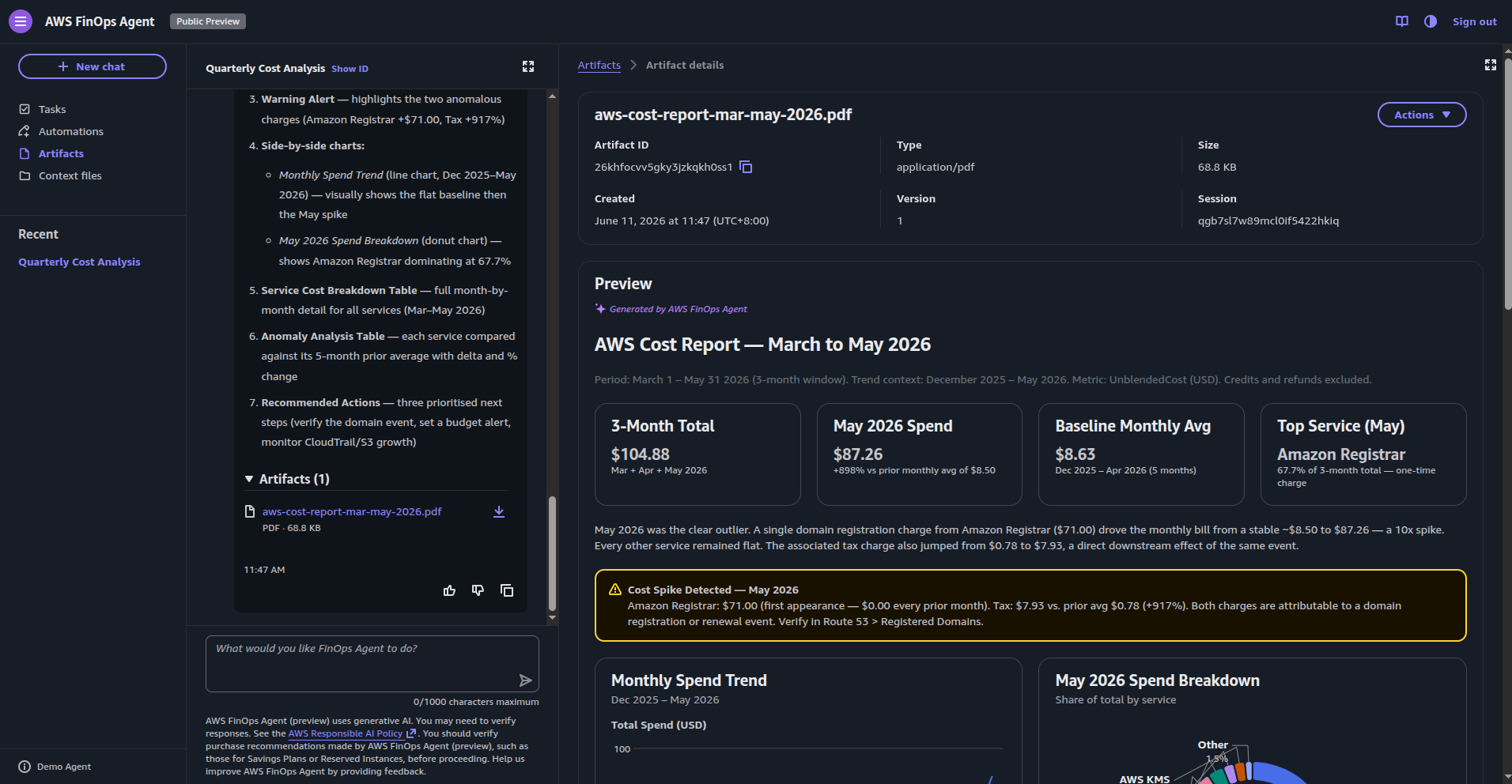
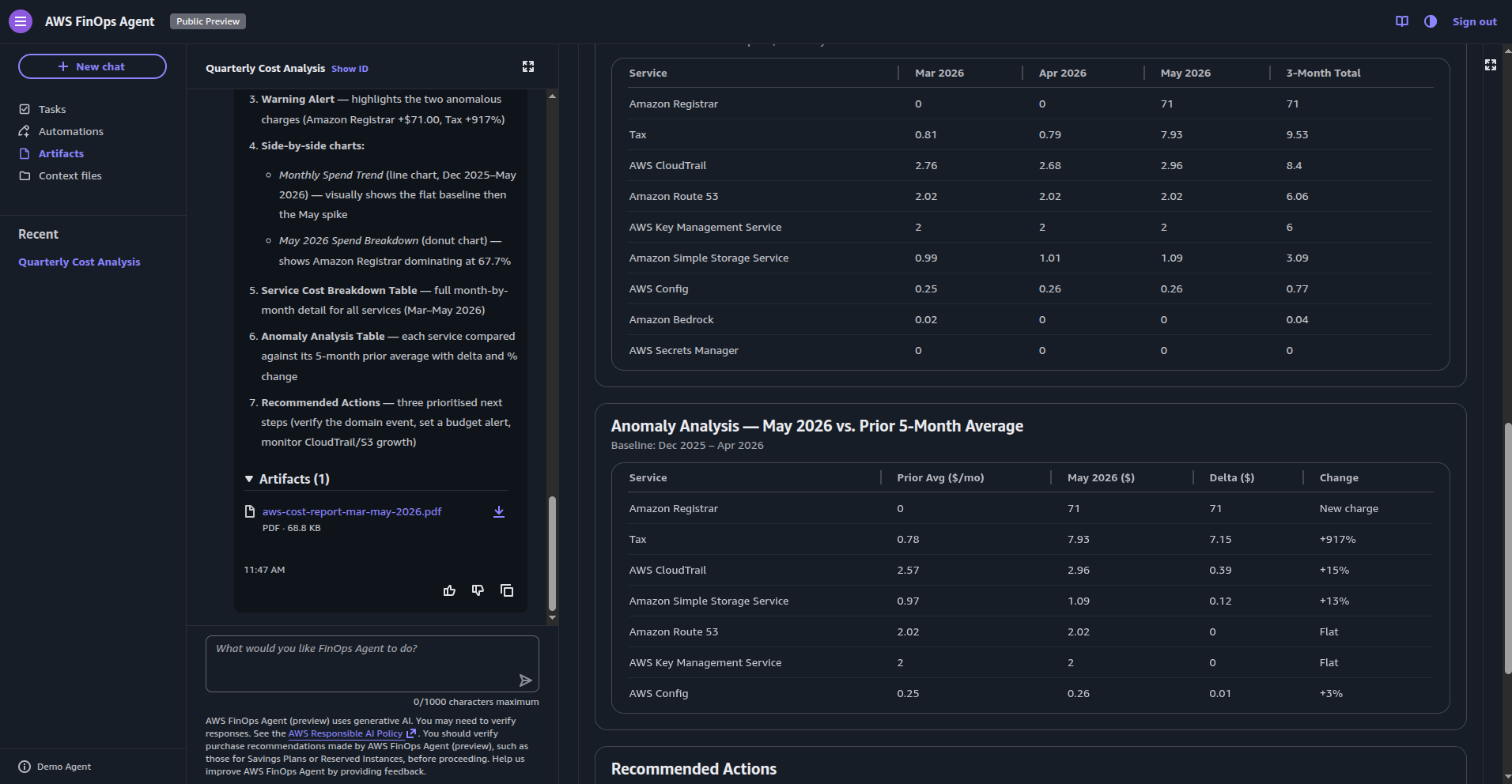
The anomaly analysis section of the report breaks down which services deviated from the prior 5-month average, with delta in dollar and percentage terms:
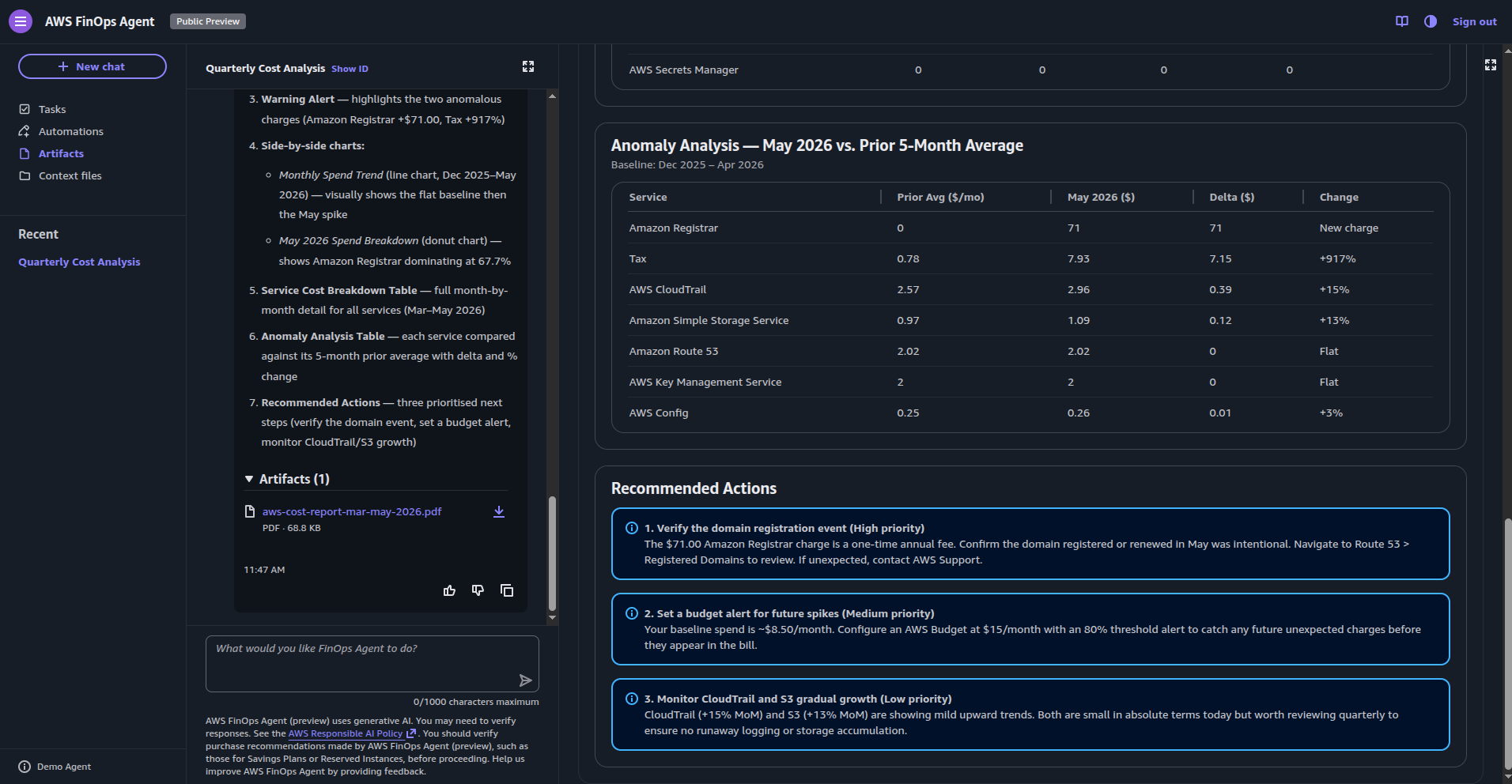
The recommended actions section is prioritised by impact, with specific, actionable steps (these are quite generic given the low activity in my dev account):
The IAM Model
Two IAM roles are created during setup, each with a specific managed policy.
FinOpsAgentRole (FinOpsAgentAgentPolicy) - This is the identity the agent assumes when doing its work. This is read-only across all data sources, with an additional write permission scoped specifically to managing EventBridge rules (used for scheduling), constrained by a ManagedBy: finops-agent.amazonaws.com principal condition:
{
    "Version": "2012-10-17",
    "Statement": [
        {
            "Sid": "FinOpsAgentDataAccess",
            "Effect": "Allow",
            "Action": [
                "ce:GetCostAndUsage",
                "ce:GetCostAndUsageWithResources",
                "ce:GetCostForecast",
                "ce:GetUsageForecast",
                "ce:GetDimensionValues",
                "ce:GetTags",
                "ce:GetCostCategories",
                "ce:GetCostAndUsageComparisons",
                "ce:GetCostComparisonDrivers",
                "ce:GetSavingsPlansCoverage",
                "ce:GetSavingsPlansUtilization",
                "ce:GetSavingsPlansUtilizationDetails",
                "ce:GetSavingsPlansPurchaseRecommendation",
                "ce:GetReservationCoverage",
                "ce:GetReservationUtilization",
                "ce:GetReservationPurchaseRecommendation",
                "ce:GetAnomalies",
                "ce:GetAnomalyMonitors",
                "ce:ListCostAllocationTags",
                "ce:ListCostAllocationTagBackfillHistory",
                "ce:DescribeCostCategoryDefinition",
                "ce:ListCostCategoryDefinitions",
                "budgets:ViewBudget",
                "cost-optimization-hub:GetRecommendation",
                "cost-optimization-hub:ListRecommendations",
                "cost-optimization-hub:ListRecommendationSummaries",
                "compute-optimizer:DescribeRecommendationExportJobs",
                "compute-optimizer:GetEnrollmentStatus",
                "compute-optimizer:GetEnrollmentStatusesForOrganization",
                "compute-optimizer:GetRecommendationSummaries",
                "compute-optimizer:GetEC2InstanceRecommendations",
                "compute-optimizer:GetEC2RecommendationProjectedMetrics",
                "compute-optimizer:GetAutoScalingGroupRecommendations",
                "compute-optimizer:GetEBSVolumeRecommendations",
                "compute-optimizer:GetLambdaFunctionRecommendations",
                "compute-optimizer:GetRecommendationPreferences",
                "compute-optimizer:GetEffectiveRecommendationPreferences",
                "compute-optimizer:GetECSServiceRecommendations",
                "compute-optimizer:GetECSServiceRecommendationProjectedMetrics",
                "compute-optimizer:GetLicenseRecommendations",
                "compute-optimizer:GetRDSDatabaseRecommendations",
                "compute-optimizer:GetRDSDatabaseRecommendationProjectedMetrics",
                "compute-optimizer:GetIdleRecommendations",
                "ec2:DescribeInstances",
                "ec2:DescribeVolumes",
                "ecs:ListServices",
                "ecs:ListClusters",
                "autoscaling:DescribeAutoScalingGroups",
                "autoscaling:DescribeAutoScalingInstances",
                "lambda:ListFunctions",
                "lambda:ListProvisionedConcurrencyConfigs",
                "organizations:ListAccounts",
                "organizations:DescribeOrganization",
                "organizations:DescribeAccount",
                "rds:DescribeDBInstances",
                "rds:DescribeDBClusters",
                "pricing:DescribeServices",
                "pricing:GetAttributeValues",
                "pricing:GetProducts",
                "freetier:GetFreeTierUsage",
                "bcm-pricing-calculator:GetPreferences",
                "bcm-pricing-calculator:GetWorkloadEstimate",
                "bcm-pricing-calculator:ListWorkloadEstimateUsage",
                "bcm-pricing-calculator:ListWorkloadEstimates",
                "cloudtrail:LookupEvents",
                "cloudtrail:DescribeTrails",
                "cloudtrail:GetTrailStatus",
                "cloudtrail:GetEventSelectors",
                "cloudwatch:GetMetricData",
                "cloudwatch:GetMetricStatistics",
                "cloudwatch:ListMetrics",
                "logs:StartQuery",
                "logs:GetQueryResults"
            ],
            "Resource": "*"
        },
        {
            "Sid": "EventBridgeManagedRuleManagementWritePermissions",
            "Effect": "Allow",
            "Action": [
                "events:PutRule",
                "events:PutTargets",
                "events:DeleteRule",
                "events:RemoveTargets",
                "events:EnableRule",
                "events:DisableRule"
            ],
            "Resource": "arn:aws:events:*:*:rule/*",
            "Condition": {
                "StringEquals": {
                    "events:ManagedBy": "finops-agent.amazonaws.com",
                    "aws:ResourceAccount": "${aws:PrincipalAccount}"
                }
            }
        },
        {
            "Sid": "EventBridgeManagedRuleManagementReadPermissions",
            "Effect": "Allow",
            "Action": [
                "events:DescribeRule",
                "events:ListTargetsByRule"
            ],
            "Resource": "arn:aws:events:*:*:rule/*",
            "Condition": {
                "StringEquals": {
                    "aws:ResourceAccount": "${aws:PrincipalAccount}"
                }
            }
        }
    ]
}
FinOpsAgentOperatorRole (FinOpsAgentOperatorPolicy) - The identity assumed by the web app and users interacting with the agent. This controls the agent API surface: creating conversations, managing tasks, handling automations, uploading context files, and downloading artifacts.
The full IAM action lists for both roles and their condition keys are documented at the AWS service authorization reference.
Security and Guardrails
Currently, the agent’s read-only actions - querying cost data, retrieving optimisation recommendations, searching memory, reading context files - execute without requiring approval.
The write-capable actions are currently limited to three: creating a Jira issue, adding a Jira comment, and posting a Slack message. These require approval depending on how the task was invoked, giving you a checkpoint before the agent takes action outside its own workspace.
The behavioral guardrails are currently non-configurable and I expect these will change over time.
Observations and Additional Thoughts
No Terraform or IaC support yet - Currently there’s no provider or resource to deploy and configure the agent as code at this stage, due to the absence of a public API for the service. Given the trajectory of the DevOps Agent, I’d expect this to arrive soon.
Deployment patterns - What we learnt from working with other frontier agents is it is best to scope individual agent instances to a specific area or domain rather than deploying one agent per account with broad remit. That would mean separate agents for your network components, shared infrastructure, and likely each deployed application - each with its own context data, tagging taxonomy and IAM scope. This keeps the agent focused, avoids hitting limits and quotas, and produces more relevant recommendations because the context isn’t diluted across unrelated workloads and resources. In addition to this, tightly scoped agents may also help keep service costs manageable - particularly if token consumption factors into the service’s billing model - though the full pricing dimensions aren’t yet available.
Tagging fundamentals still matter - Like many other applications of AI (and as I’ve written about in the past), this isn’t a substitute for getting the basics right. An agent querying cost data gets the best results when resources are consistently tagged and tag enforcement policies are in place. Inconsistent tagging means inconsistent attribution, which generally leads to vague recommendations. The agent amplifies good data hygiene; it can’t compensate for the absence of it. A strong tagging strategy, optionally enforced at scale using AWS Organizations tag policies, is the right starting point if that’s not already in place.
Features I’d like to see
This is a preview service, and there are capabilities I’d like to see added as it matures - though given the trajectory of the DevOps Agent, I’d expect many of these are already on the product team’s radar.
-
Infrastructure code integration - connecting the agent directly to your codebase, detecting things like missing tags on Terraform resources or Auto Scaling Groups not cascading tags to instances, and raising those as actionable findings rather than after-the-fact cost observations
-
Architectural recommendations - surfacing cost-driven architectural guidance as specs that development agents could pick up and apply directly
-
An API - unlocking IaC-driven deployment patterns and dynamic agent configuration, including managing context programmatically
-
Remediation actions - the ability to invoke SSM or similar mechanisms in response to cost events such as anomalies or budget breaches, moving from observation to action
-
Broader invocation support - triggering agents through external sources, webhooks, and events rather than only through the console
-
Well-Architected Framework alignment - these agents becoming a core tenet of a future uplift to the framework
Closing Thoughts
Overall, this is a capable service in its infancy that is easy to set up and use in its current preview form. It’s worth being clear though - this isn’t a replacement for your FinOps practice or the people running it. It’s a tool that works alongside your existing engineering and FinOps functions, helping teams cut through the volume and complexity of cloud cost data rather than substituting the expertise and process that a mature FinOps capability brings.
It’s obviously still under active development with more to come. The current feature set makes it a practical addition to the financial optimisation toolkit, and pricing will be a key factor once it moves out of preview. If cloud billing and FinOps is your domain, or you carry responsibility for cloud spend in your team, it’s worth getting hands on while access is free.
This post was written with assistance from AI, and I’ve worked to made sure all examples, configurations, and recommendations are technically accurate as of the time of writing.